
Ask a senior AppSec engineer what they do first on a new review and they won’t say “look for bugs.” They’ll say “figure out how the thing works.” Who logs in, and how? Where does authorization live? Is there an admin panel, and who can reach it?
That mental model is what separates a real finding from code that just looks scary. It’s also the first thing to go stale, and the hardest thing to hand off.
Today we’re launching SecMap. It connects the application features and security mechanisms DryRun identifies in a repository to the code behind them. Open the repository’s map in the dashboard to inspect those relationships and check the supporting evidence yourself.
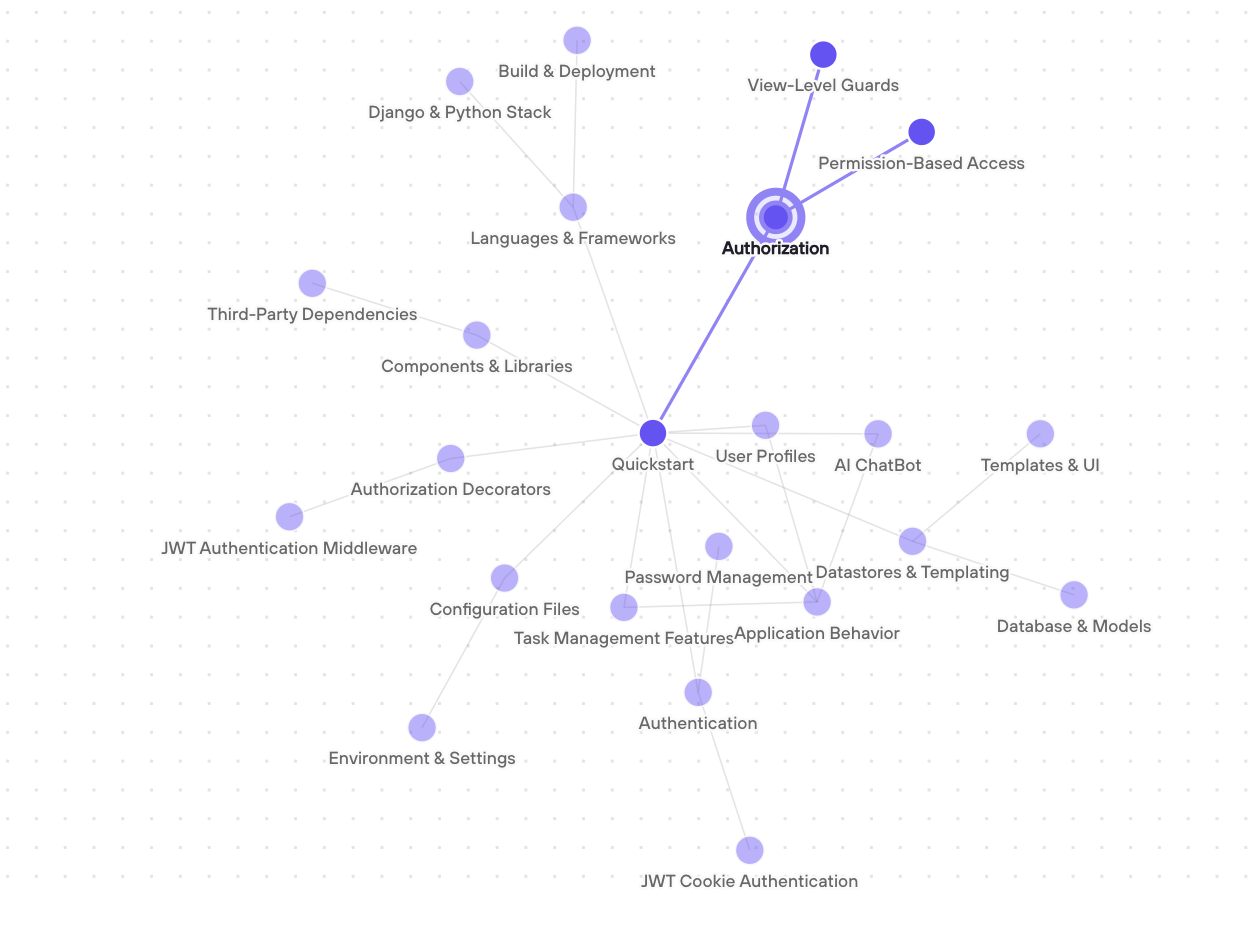
The node view shows application features and security mechanisms together, so you can follow their relationships before opening the underlying code.
Why we built it
DryRun has always started with context. DeepScan builds an understanding of the application before our agents start investigating. That same understanding informs PR Code Reviews and DryRun Security Intelligence.
Until now, that context lived in topic documents, one per area. They worked well until applications got big. A single authorization doc had to cover roles, guards, and admin surfaces, so detail got squeezed out. An agent checking one export endpoint had to read the whole overview to find the two facts it needed. When the code changed, those documents had to be rebuilt. SecMap gives that knowledge a more useful structure.
What’s in the graph
The topic summaries are still there at the top level: application behavior, languages and frameworks, components and libraries, datastores and templating, configuration, authentication, authorization, and authorization decorators.
Underneath are detailed nodes for the features and security mechanisms DryRun identifies. Browser sessions, service tokens, and single sign-on can each get a node instead of sharing one paragraph. The same goes for features like billing or exports, or a support tool that lets staff sign in as a customer.
Edges follow the code. An export feature can link to the guard that protects it, and an admin surface can link to the role model that governs it. Follow those connections back to the supporting source files.
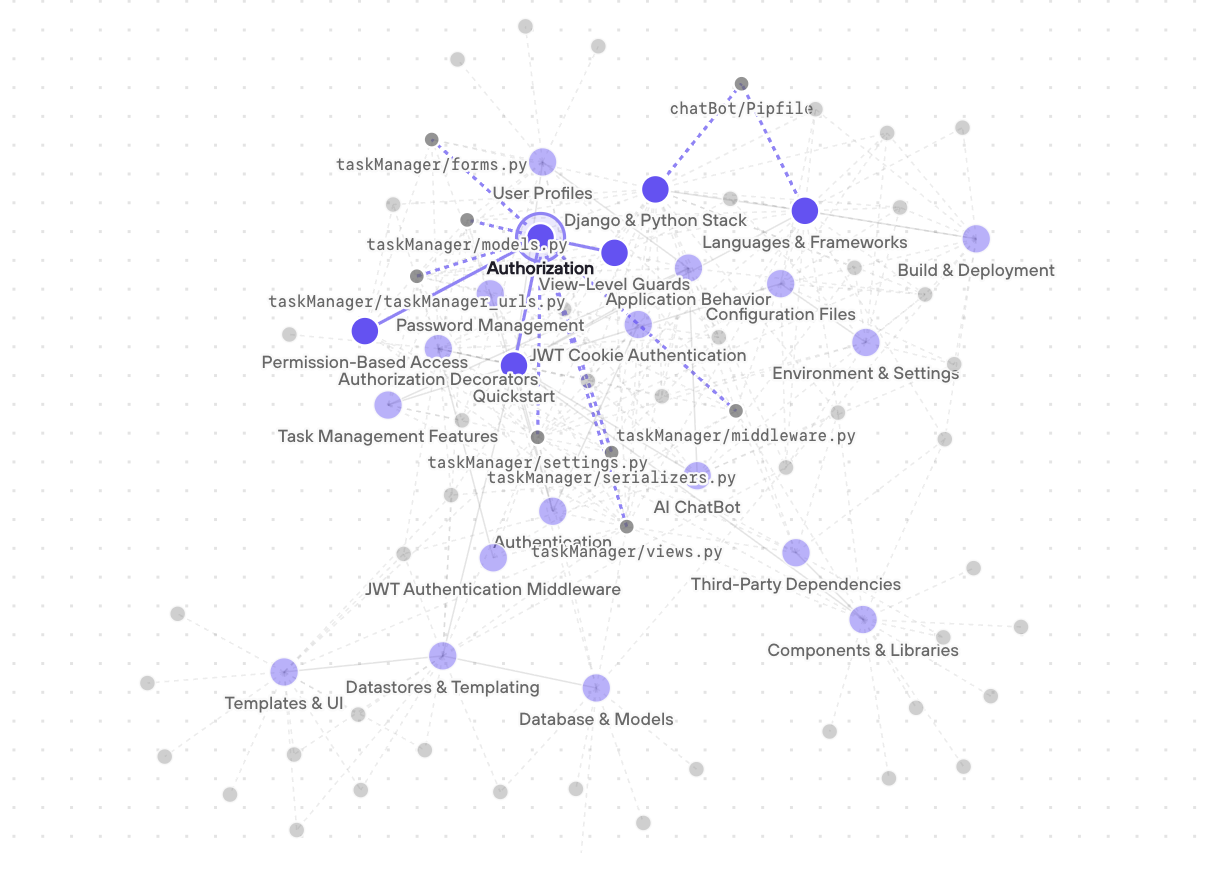
Turn on source files to see where the graph’s authorization context comes from.
Every claim comes with receipts
A diagram shows you how an application fits together. The evidence is what lets you check the details yourself. Security-relevant claims cite source files and, where provided, line ranges at the analyzed revision. DryRun checks that each cited file exists and is in scope, validates any line ranges, and checks that links between nodes resolve.
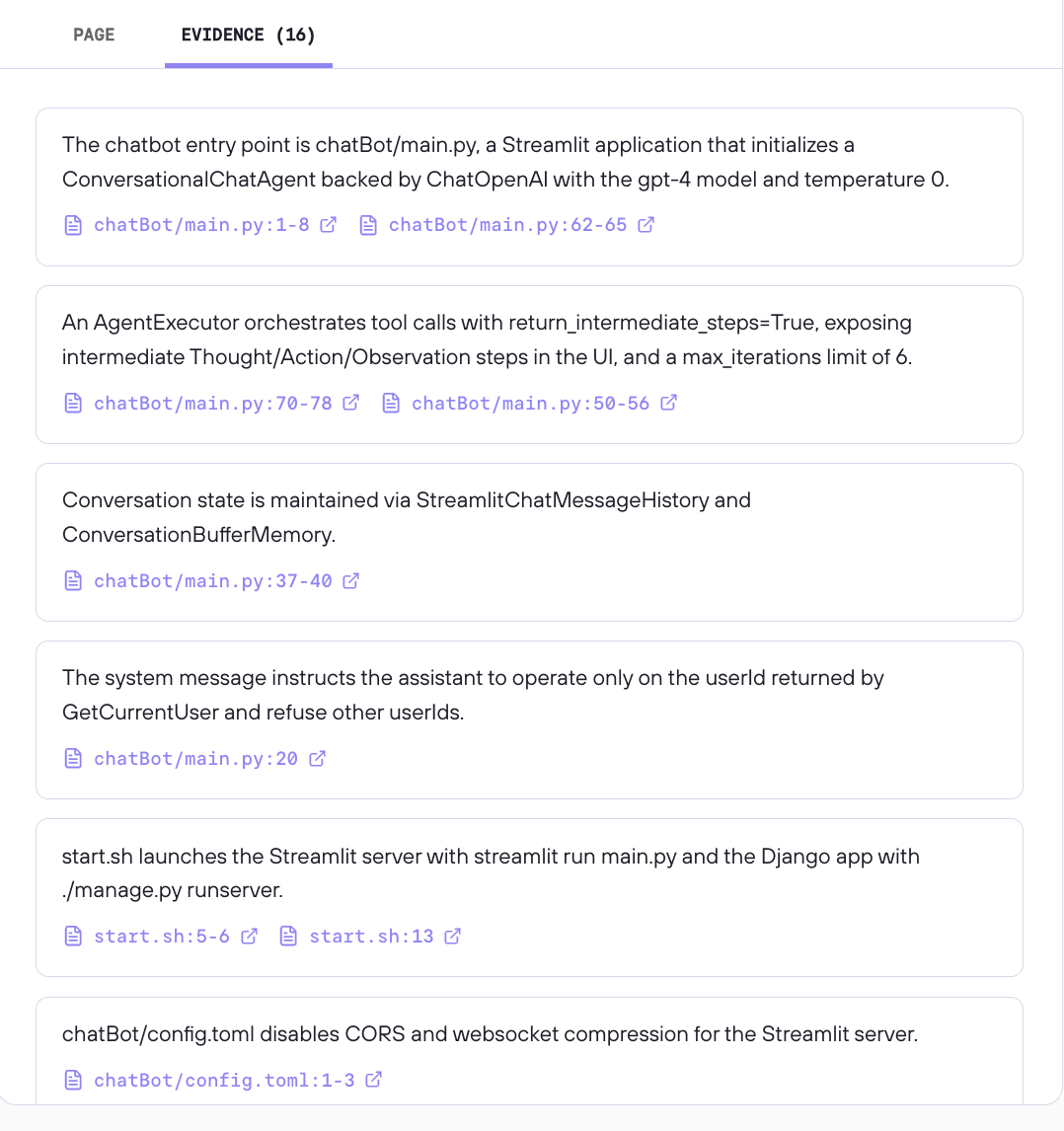
Separate AI ChatBot example. The Page Evidence panel shows the claims DryRun recorded and their file and line references. A cited prompt instruction is not proof of enforced authorization.
That precision matters most when something seems absent. Saying “this route defines no route-level middleware” is not the same as saying “this application applies no middleware to this route.” The first tells the reviewer exactly what was observed. The second may overlook middleware applied elsewhere. The same principle applies to feature flags and other variations: say which case the source supports instead of generalizing.
Our rule of thumb is simple. A dropped claim costs less than a wrong one.
Put the evidence to work
Start with an export feature in your repository’s SecMap. The map can point you to a shared authorization guard that isn’t visible in the export endpoint itself. Follow that connection to code, then use what you find:
- Prioritize a review. If the guard changes, trace which mapped features depend on it. Verify those paths in code before deciding what to inspect first.
- Teach a new reviewer how the application works. Give them a real flow to walk: where the export starts, which guard runs, and what evidence backs that up.
- Build or update your own threat model. Reuse the repository evidence instead of starting with a blank page or a stale diagram. Add what you know from cloud configuration, infrastructure as code, and deployment or service evidence. Then ask which paths cross a trust boundary and verify both sides.
The map is a lead, not a verdict. If a relationship affects your conclusion, confirm it in source on the actual path under review. Findings cite your code, not the graph.
It stays current
A map that’s right on day one and wrong a month later is a liability. That’s even more true now that coding agents ship changes every day.
Because nodes are tied to source evidence, DryRun can reuse context whose evidence hasn’t changed and recheck affected nodes on subsequent scans. Changed context can be updated, new features can be added, and nodes can be retired when the code behind them goes away.
For security leaders, this helps answer the questions you get every week: What do we have, and what changed? A map of entry points, authentication, roles, admin surfaces, and integrations is a useful starting point for inventory, prioritization, and advisory response.
How it compares
Category descriptions summarize common uses; capabilities, update methods, and evidence detail vary by product and configuration.
| Tool category | Built for | Unit of knowledge | Kept current by | Can you audit it? |
|---|---|---|---|---|
| Generated developer wikis | Developer onboarding | Prose pages | Regenerating docs | Source links, where provided |
| Code graphs and context engines | Navigation and retrieval | Symbols, references, embeddings | Re-indexing | Inspect symbols and references |
| Security graphs and ASPM | Inventory and finding correlation | Entities, assets, findings | New scans | Asset and finding relationships |
| AI reviewer threat models | Steering a scan | Threat-model summaries or structured models | Regenerating or manual edits | Evidence varies by implementation |
| DryRun SecMap | Security review by people and agents | Features and security mechanisms with source citations | Recheck affected context as code changes | Inspect cited source at the analyzed commit |
Get started
Open a connected repository in DryRun to explore its SecMap. The context fills in as your team uses the repository. Start with a feature you know, follow a connection, and inspect the supporting source evidence. Get a demo to follow a feature from application context to the code behind it and see how that context informs a review.