Do security teams have too little to do? Are there too few alerts to investigate? Is your menagerie of security tools not producing enough findings to manage? If this is your current situation, congratulations! For the rest of us, we’re struggling to prioritize a mountain of information, all of which needs to be validated, filtered, and remediated.
If security teams and downstream consumers cannot handle the volume of security concerns then increasing this volume would be considered problematic and therefore we should work to eliminate noise and ultimately, waste.It seems like a simple conclusion, right?
Yet when it comes to evaluating security tools, security teams are often tempted to consider a tool with fewer findings to be inferior to a tool with more findings. If “x” tool finds more than “y” tool, then “x” tool must be the better tool, right? It’s almost a form of security FOMO
Some part of this, we believe, holdover behavior from the time of deterministic scanning where scanners could only do what they could do but humans were required to interpret and validate the “raw data” produced by scanners. Naturally, having more of that “raw data” was seen as having more capability. We don’t live in that world now and we shouldn’t evaluate tools like we are.
A tool does not make an organization more secure merely by identifying more things that could, under some set of assumptions, be considered security concerns. The value of a tool is determined by whether it helps the organization identify and address the risks that actually matter. Those are very different standards.
False Positives
Let’s begin with the obvious problem: a bunch of junk output is unhelpful, wastes time, and reduces trust in a tool as well as the team who delivers its output. If unvalidated issues are sent to engineering teams, they will quickly revolt. Not only will they be unhappy with the tool, they will not trust future requests from the security team. And lack of trust causes security teams to be ineffective.
To truly compare two tools, you must ideally know the true positive, false positive, and false negative (missed vulnerability) rates. This can be challenging, even with AI assistance (validation is actually a known weakness with AI)! It requires carefully going through the findings, understanding how each tool reports vulnerabilities, and comparing them as fairly as possible.
But first let’s consider the unlikely but easier to reason about case where neither tool produces any false positives. Every finding is a legitimate security concern. In that case,now does the tool with the most findings win? Well, still a “no”.
Reporting Differences
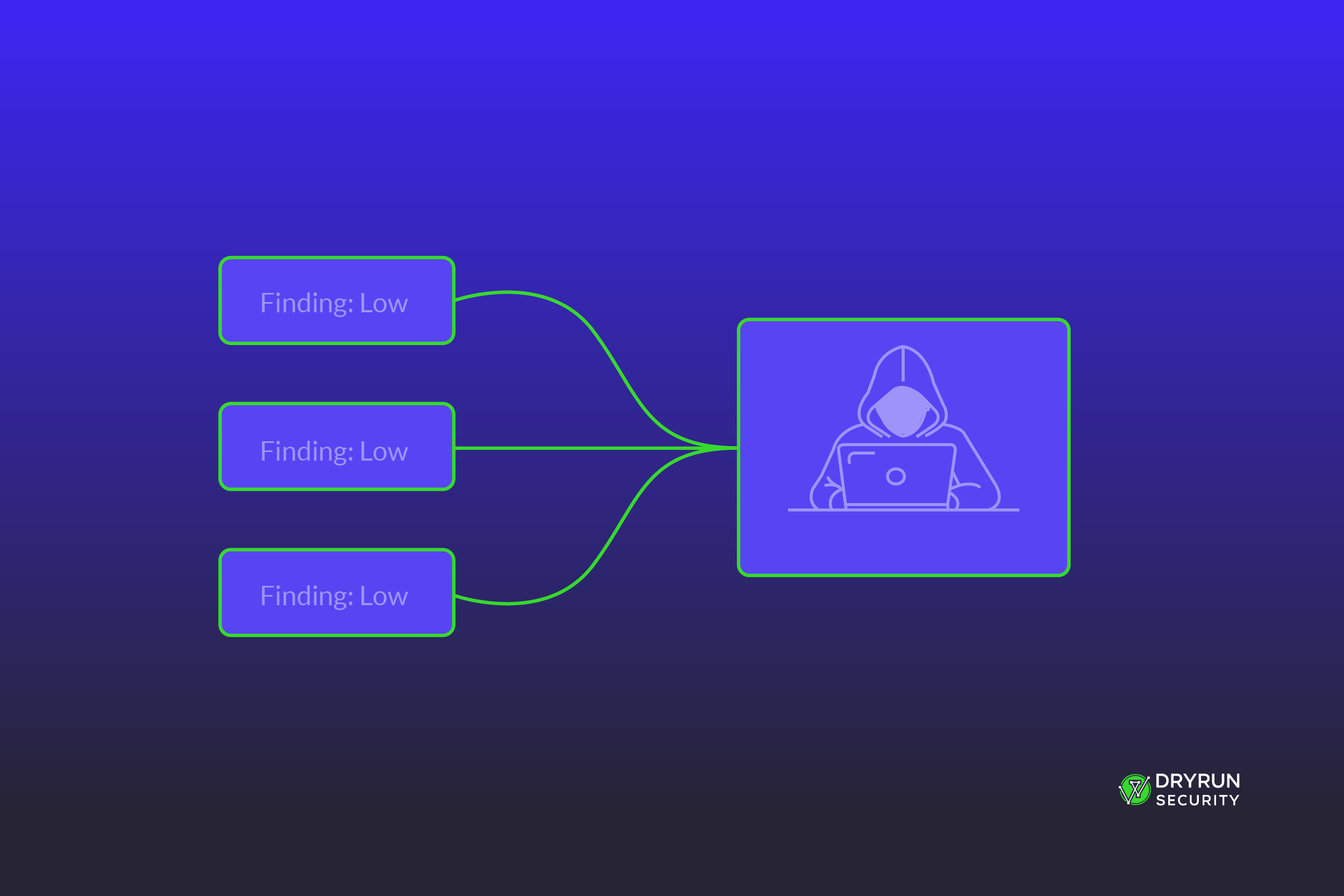
On the technical side, a difference in raw numbers of reported issues does not even indicate that two tools found different issues. The difference in numbers may be related purely based on how the issues are reported. For example, some tools attempt to combine findings based on root causes. Others may have a single finding for a pattern that occurs in multiple locations. At DryRun we specifically unify findings that, when chained together, increase the total severity and become an exploit chain. There is real value in that, there is true intelligence in that, but 4 low severity issues become 1 critical issue. The numbers, when viewed by raw count, are deceiving.
This means even comparing a narrow band of findings - let’s say only the “critical” findings from two tools - requires carefully reading each one to understand how many underlying vulnerabilities are actually represented. It may easily be the case that both tools report the same issues, just in different ways.
External Factors
It is rare for a single tool to have universal knowledge of the technical and product environment in which it operates. As a result, a finding may be “true” in the sense that it is accurately describing the behavior or possible exploitation, but the finding is actually mitigated elsewhere or isn’t an issue in the product.
Denial of service is a common example: a DoS may be technically possible based on the application code, but is often mitigated by network-level rate-limiting. Another example is privacy of information. A banking application has much different confidentiality expectations than a social media application.
So even for true positives, it’s necessary to review to see which ones truly apply.
Risk Thresholds
Sticking with the 100% true positive scenario, we also must consider how companies work in reality. Organizations rarely have time to address every security finding, not every finding is worth spending time on, and sometimes the risk of a vulnerability is outweighed by the requirements of the business.
This leads to a risk-first approach: start at the highest severity findings and work down the list. There is usually a cut-off, as well. When there are many issues, perhaps only criticals/highs are even in scope. The rest are ignored.
If this is the case, then producing more findings (especially those below the threshold) has no useful impact. They will never be remediated. When evaluating a security tool, the most useful output will be impactful, relevant, and actionable. You cannot tell that by the numbers.
Measure What Matters
The most useful security output is not the largest pile of technically defensible observations. It is the smallest set of information that allows the organization to make the right decisions about its most important risks.
When evaluating a security tool, better questions include:
- Did it identify the vulnerabilities that matter most?
- Did it explain why they are exploitable in this application
- Did it distinguish root causes from repeated symptoms?
- Did it account for relevant technical and business context?
- Could the security team validate the results efficiently?
- Could developers understand and act on them?
- Did the findings lead to meaningful remediation?
These questions are harder to answer than comparing two numbers on a slide. They also tell you considerably more about whether the tool will improve your security program.
Coverage still matters. False negatives matter enormously. A quiet tool that misses critical vulnerabilities is not superior because it creates less work but the opposite is equally true as well. A noisy tool is not demonstrating better discernment because it filled the dashboard. The goal is better decision making not “more findings”.
Conclusion
There is no perfect security tool today that discovers every vulnerability, produces zero false positives always, understands every compensating control, and correctly models every organization’s tolerance for risk. And yes, that’s still true even in the era of AI. While we’re getting much closer to that world, and this might be weird to hear from a security vendor, but it does not yet exist.
Every tool makes tradeoffs and so, when evaluating security tools, avoid the temptation to assume the tool produces more output is the better tool. Instead, judge security tools by the quality of the decisions they enable. There is no such thing as a flawless tool even if we’re collectively working towards that goal. It will always be a balance of many considerations.
More findings don’t make you more secure. Better decisions do.
See how DryRun connects related issues, filters out the noise, and gives your team the context to focus on the risks that actually matter.